So, you’re ready to build an ecommerce store. The first question on your mind is probably the same one everyone has: What’s this actually going to cost me?
The honest answer is that building an online store can cost anywhere from under $1,000 for a simple DIY setup to well over $50,000 for a completely custom enterprise solution. That’s a huge range, but the final price tag really boils down to your project’s scope, the technology you pick, and the specific features you need to get your business off the ground and running successfully.
What Is the Real Cost of an Ecommerce Website?
Think of building an ecommerce site like building a house. You could start with a prefabricated kit—it’s affordable and gets the job done fast. Or, you could hire a team of architects to design a custom mansion from the ground up. Both options give you a place to live, but the process, features, and final cost are worlds apart. Your online store is no different. The choices you make will directly shape the final invoice.
Your first big decision is choosing between a user-friendly platform like Shopify or Wix and a completely custom-built solution. For a basic store on one of these platforms, you can get started for as little as $100 to $1,000 for the first year. That typically covers your domain name, hosting, and a pre-made theme.
On the other hand, if you need a unique design or specialized features that templates can’t offer, you’ll be hiring developers. That’s when the price tag jumps into the $5,000–$20,000 range, or even higher. It’s why most small businesses opt for a more affordable, template-based solution to get their foot in the door.
This guide is your roadmap to understanding all these numbers. We’re going to demystify the process, help you put together a realistic budget, and give you the confidence to make the right calls for your business. For a platform-specific look at these figures, it’s worth checking out this analysis on How Much Is A Shopify Store.
Just remember, the initial development cost is only one piece of the puzzle. To actually make sales, your store needs to be visible. That’s where a smart marketing strategy comes in. Our comprehensive ecommerce SEO services are designed to drive traffic and turn those clicks into customers long after your site goes live.
By the end of this guide, you’ll know exactly what you’re paying for and why. Let’s get into it.
Deconstructing Your Core Development Costs
Every ecommerce project, big or small, boils down to three core cost centers. It helps to think of it like building a physical retail store. First, you need a location (your platform). Then, you need an attractive storefront and layout (your design). Finally, you need the tools to actually run the business, like a cash register and inventory system (your apps).
Your choices in these three areas will form the foundation of your budget.
Making smart decisions here isn’t just about the initial investment; it’s about preventing costly headaches and limitations down the road. Let’s break down each component so you know exactly where your money is going.
Your Platform: The Digital Lease
First up is your ecommerce platform—the digital equivalent of leasing a retail space. This is the underlying software that powers your entire store, and it’s arguably the single biggest factor influencing your total development cost.
You’ve got two main paths to choose from:
- SaaS (Software-as-a-Service) Platforms: This is like leasing a spot in a modern shopping mall. Platforms like Shopify or BigCommerce give you everything you need right out of the box—hosting, security, payment processing—all for a predictable monthly fee, typically from $29 to $299.
- Open-Source Platforms: This is like buying the land and building the store yourself. Software like WooCommerce (for WordPress) or Magento (now Adobe Commerce) is free to download, but you’re on the hook for everything else. That includes arranging your own web hosting services, which become absolutely critical for performance and security.
SaaS platforms are a fantastic starting point for businesses that want to launch quickly with built-in support and predictable costs. Open-source offers unparalleled freedom for customization, but it demands a bigger upfront budget and ongoing technical maintenance.
Your Design: The Storefront and Layout
Once you have your “location,” it’s time to think about your storefront. A compelling design does more than just look good; it builds trust and smoothly guides shoppers toward making a purchase. Just like with the platform, your cost options here run the gamut.
A template-based design is the fastest and most affordable route. Most platforms offer free themes to get you started, while premium themes with more advanced features and better design usually carry a one-time cost of $50 to $200. They’re great for getting off the ground but can make it harder for your brand to stand out in a crowded market.
On the other end of the spectrum is a custom design, which gives you complete creative control. You’ll work directly with designers and developers to build a unique user experience tailored specifically to your customers. This is obviously a bigger investment, with costs often starting around $2,000 and climbing based on complexity, but the result is a site that is truly one-of-a-kind.
Your Apps: The Cash Register and Inventory System
Finally, you need the tools to actually run the business. In a physical shop, this would be your cash register, barcode scanner, and security system. Online, we call these apps, plugins, or extensions.
These little programs bolt crucial functionality onto your store. Some of the essentials you’ll likely need include:
- Payment Gateways like Stripe or PayPal, which usually charge a small fee on each transaction (e.g., 2.9% + $0.30).
- Shipping Integrations that calculate real-time rates and print labels.
- Marketing Tools for running email campaigns, collecting reviews, or creating pop-ups.
- Analytics Plugins to help you track visitor behavior and understand sales data.
While many basic versions are free, the premium apps with the features you’ll really want can range from $10 to $100+ per month each. Being disciplined and selecting only the apps you truly need is key to keeping your recurring costs under control.
The Features That Drive Up Your Final Bill
So, what’s the difference between a $5,000 ecommerce site and a $25,000 one? Almost always, it comes down to the features. Every online store needs the basics—a product catalog, a shopping cart, and a way to check out. But the features that turn a simple digital storefront into a powerful, interactive sales machine are what really move the needle on your final price.
These customizations add layers of complexity that demand serious development time and expertise, which is directly reflected in your invoice.
It’s like buying a car. The base model will get you from point A to point B just fine. But if you want the premium sound system, heated leather seats, and a top-of-the-line navigation system, the sticker price climbs quickly. Your ecommerce site works the same way; the more bells and whistles you add, the bigger the investment.
The True Cost of Customization
Not all features carry the same weight. Adding a subscription model, for instance, is a different beast entirely from building a custom product builder from scratch.
Imagine you sell t-shirts. A standard store with a few dozen pre-set designs is fairly straightforward. But what if you want to let customers upload their own photos, add custom text, choose fonts, and see a live preview of their creation right on the shirt? That’s not a simple feature; it’s a highly intricate and expensive build.
This is where you have to get real about what’s a “must-have” for your business versus a “nice-to-have” luxury that can wait. Having these frank conversations with your development team early on is the key to keeping your budget in check. You can get a better sense of how design choices play into this by exploring these essential website design best practices.
The infographic below gives you a clear visual on the average added cost for some of the most popular ecommerce features, showing just how wide the gap can be between a standard setup and a more advanced one.
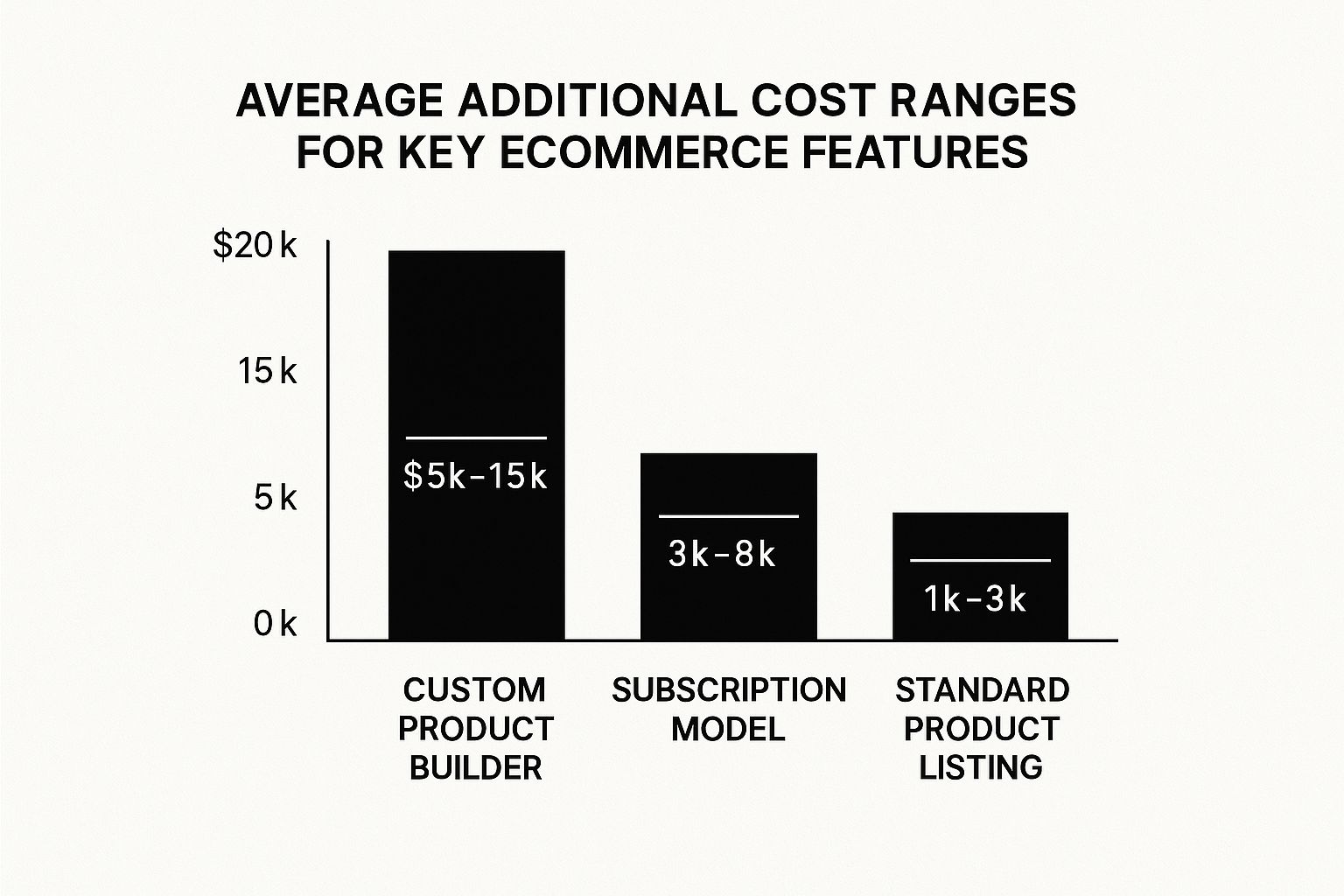
As you can see, something like a custom product builder can tack on an extra $5,000 to $15,000 (or more) to your project, making it one of the biggest potential cost drivers.
High-Impact Features and Their Price Tags
Beyond product builders, a handful of other common features can significantly inflate your budget. Knowing what they are and what they cost helps you make smart decisions about where to put your money for the best possible return.
Here are a few common features that will escalate your final price:
- Subscription Models: If you want to offer recurring billing for products or services, expect to add $3,000 to $8,000. This isn’t just a simple payment button; it involves complex billing logic, customer account management portals, and automated renewal systems.
- Third-Party System Integrations: Need your website to talk to your inventory management system, Customer Relationship Management (CRM), or Enterprise Resource Planning (ERP) software? These custom integrations can be a heavy lift, often running anywhere from $5,000 to $20,000+, depending on how complex the data syncing needs to be.
- Advanced Search and Filtering: A basic search bar is standard. But if you want intelligent, “smart” search with features like autocomplete, typo correction, and dynamic filtering by attributes like size, color, or brand, you’re looking at specialized tools and development that can add several thousand dollars to the project.
Here’s the bottom line: every unique feature you add is like a mini-project nested within your larger website build. To make sure every dollar counts, prioritize the functionalities that either solve a major customer pain point or give you a clear competitive advantage.
Choosing Your Builder: DIY, Freelancer, or Agency?
Once you’ve got a good handle on the features you absolutely need, the next big fork in the road is deciding who is going to build your website. This decision is just as critical as the technology you choose, because it directly shapes your initial ecommerce website development cost, the project timeline, and your store’s long-term potential for growth.
Think of it like building a house. You could grab a hammer and do it yourself (DIY), hire a specialized plumber for the kitchen (freelancer), or bring in a general contractor to manage the whole project from the ground up (agency). Each path has its own set of very real pros, cons, and costs.
The DIY Approach With Website Builders
Jumping onto a platform like Shopify or Wix is easily the most budget-friendly route. It’s a perfect starting point for new businesses or anyone with more time than money. These builders give you user-friendly, drag-and-drop tools and a library of pre-made templates, letting you get a basic store online fast with almost zero coding knowledge.
But that affordability comes with strings attached. You’re mostly confined to the platform’s templates and built-in features, which can make it tough to carve out a truly unique brand experience. As your business scales, you might find yourself hitting a ceiling in terms of customization and power, eventually forcing you into a costly and complicated migration. When you’re weighing your options, taking a look at various e-commerce CMS platforms can help you compare features against their price tags.
Hiring a Freelance Developer
Hiring a freelancer is the classic middle-ground option. You get access to specialized skills for custom design or development work without the high overhead of a full agency. This is a great choice if you have a crystal-clear vision and just need an expert to handle specific parts, like setting up a tricky plugin or coding a unique theme from scratch.
The real challenge with freelancers is finding the right person and then managing the project yourself. You’re the one vetting their skills, defining the scope of work, and making sure the final product is up to snuff. While a freelancer is often cheaper than an agency for a specific task, the costs can quickly climb if the project’s scope creeps or you need to hire multiple freelancers for different parts of the build.
Partnering With a Development Agency
Working with a professional agency is the premium choice, and it’s best suited for established businesses ready to make a serious investment in a high-performance, scalable online store. An agency brings a whole team to the table—designers, developers, project managers, and strategists—who handle every single piece of the project.
This approach delivers the highest level of quality, ongoing support, and long-term planning. It ensures your site isn’t just pretty, but also technically solid and built for future growth. The upfront investment is definitely higher, but the real value comes from their streamlined process and strategic oversight. To make sure you’re picking the right partner, it’s critical to know the 10 questions you must ask before signing with a digital marketing agency.
Comparing Ecommerce Development Approaches
To help you visualize the trade-offs, here’s a quick breakdown of the three main paths you can take. Each one has a different balance of cost, control, and required effort on your part.
| Approach | Estimated Cost | Pros | Cons | Best For |
|---|---|---|---|---|
| DIY Website Builder | $300 – $5,000+ | Low cost, fast launch, no coding needed. | Limited customization, potential scalability issues. | Startups, small businesses, and budget-conscious entrepreneurs. |
| Freelancer | $5,000 – $25,000+ | Access to specialized skills, more customization. | Requires project management, finding talent can be hard. | Businesses with clear, specific needs and in-house oversight. |
| Development Agency | $25,000 – $100,000+ | Full team of experts, strategic guidance, high quality. | Highest upfront cost, longer timelines. | Established businesses aiming for high growth and scalability. |
Ultimately, the right choice boils down to your specific situation. There’s no single “best” answer, only the one that fits your current resources and future ambitions.
Key Takeaway: Your choice of builder should line up perfectly with your budget, your technical comfort level, and your long-term business goals. A DIY platform is fantastic for a quick launch, a freelancer is a rockstar for specific tasks, and an agency delivers a comprehensive, growth-focused solution from start to finish.
Beyond the Build: Uncovering the Hidden and Ongoing Costs
That initial development quote? Think of it as just the price of admission. A truly successful online store requires you to look beyond the launch and plan for the ongoing expenses that keep it running, secure, and profitable.
Let’s pull back the curtain on the recurring costs that are often overlooked in the excitement of a new project.
It’s a bit like buying a car. The sticker price is just the beginning; you still have to account for gas, insurance, and routine maintenance. Adopting this mindset helps you calculate the true total cost of ownership (TCO) and sidestep the kind of financial surprises that can easily sink a new online business.
Essential Recurring Costs
Once your store is built, a set of predictable, recurring charges kicks in. These are the non-negotiables—the expenses that keep the lights on and the virtual doors open.
- Hosting and Domain: Your domain name is your online address, which typically costs $10 to $30 per year. Web hosting is the digital real estate your store is built on, with prices swinging from $5 to $250+ a month depending on your traffic and performance needs.
- Platform and App Subscriptions: If you’re on a platform like Shopify, your monthly plan is a core operating expense. On top of that, premium apps for things like email marketing, customer reviews, or advanced shipping will each have their own monthly fees, often running $10 to $100 per app.
- Payment Processing Fees: Every time a customer clicks “buy,” your payment gateway (like Stripe or PayPal) takes a small piece of the action. This is usually a percentage of the sale plus a small fixed fee, like the common 2.9% + $0.30 per transaction.
These recurring fees are the operational heartbeat of your ecommerce business. Budgeting for them from day one isn’t just smart—it’s critical for maintaining healthy cash flow and avoiding shortfalls that can grind your operations to a halt.
The Budget for Growth and Security
Some of the most important ongoing costs aren’t fixed monthly bills, but they are absolutely crucial investments in your store’s health and future growth. Many entrepreneurs underestimate these, but they are vital.
For a small business hitting $100,000 in annual sales, recurring expenses for hosting, platform fees, and basic upkeep can easily add up to 2–8% of total revenue. Shopify offers a deeper cost analysis that breaks down how these operational expenses can accumulate.
Technical Maintenance and Support
Just like a car needs regular oil changes, your website requires constant upkeep to run smoothly and securely. This means software updates, bug fixes, security patches, and performance monitoring.
Without it, your site can become sluggish, vulnerable to hackers, or even break completely. Partnering with a professional provider for web maintenance services is the best way to ensure your digital storefront remains a safe and reliable place for customers to shop.
Marketing and Advertising
Let’s be honest: your website won’t magically attract customers on its own. A dedicated budget for digital marketing—including SEO, paid ads, and social media campaigns—is non-negotiable for driving traffic and making sales.
This is a variable cost that should scale as you grow, but it’s a necessary investment for any business that’s serious about competing online.
Answering Your Top Ecommerce Cost Questions
Even with a detailed plan, it’s natural to have lingering questions about the final price tag for your ecommerce website. Let’s tackle some of the most common uncertainties we hear from business owners. This section will give you direct, practical answers to help you budget with confidence and make smart, cost-effective decisions.
How Can I Lower Costs Without Sacrificing Quality?
This is the million-dollar question, isn’t it? Cutting your upfront investment without crippling your store’s potential is all about being strategic. The key is to prioritize features that directly improve the customer experience and drive sales. You don’t need every bell and whistle on day one.
Instead, launch with a lean but powerful version of your store. Here are a few ways to do that:
- Start with a Premium Theme: A professionally designed premium theme can give you a high-end look for less than $200. It’s a massive saving compared to the $5,000+ starting point for a fully custom design.
- Phase Your Feature Rollout: Launch with the essentials nailed down. You can always circle back and add more complex features, like subscription models or advanced loyalty programs, once your revenue starts flowing.
- Leverage Existing Apps: Before you pay for custom code, check the app marketplace. There’s often a ready-made plugin that can deliver the functionality you need for a small monthly fee, saving you thousands in development hours.
Is a Custom-Built Website Always Better Than Shopify?
Not at all. The “better” option is the one that fits your specific business needs, budget, and long-term vision.
Think of a platform like Shopify as leasing a prime retail spot in a bustling, high-end mall. It’s secure, modern, and comes with built-in foot traffic and all the essential tools. It’s an incredible choice for businesses that want to get to market fast with predictable monthly costs.
A custom-built website, on the other hand, is like designing and constructing your own flagship store from the ground up. You have absolute control over every single detail, from the customer journey to unique backend integrations. This path is perfect for established businesses with complex operational needs or those who feel boxed in by platform limitations.
The best choice isn’t about which platform is technically superior, but which one truly aligns with your business model. A high-performing Shopify store will always outperform a poorly planned custom build.
How Long Does It Really Take to Build a Store?
The timeline for an ecommerce build varies just as much as the cost. A straightforward store on a platform like Shopify using a pre-made theme can be up and running in just a few weeks. That’s assuming you have all your branding, product photos, and content ready to go.
However, a custom project with unique designs, complex features, and tricky third-party integrations requires a much longer runway. These builds typically take anywhere from three to six months, and sometimes even longer, depending on the scope. The process is much more involved, with dedicated phases for discovery, design, development, testing, and deployment—each requiring careful execution.
At Raven SEO, we do more than just build websites—we create strategic digital storefronts designed for growth. Whether you need a brand-new ecommerce site or want to optimize your existing one for more traffic and sales, our team is here to help. Contact us for a no-obligation consultation and let’s build your online success together.