To truly win in "voice" and "near me" search, you need to focus on three core areas: using natural, conversational language, building rock-solid local authority, and creating a perfect mobile-first experience. When you get these right, your business becomes the go-to answer when customers ask their devices for help right here, right now.
The Shift to Conversational Search and Why It Matters
The way customers find you has completely changed. We've moved past the days of typing choppy keywords into a search bar. Now, people are simply asking their devices questions as they would ask a friend.
This shift from typing to talking is a huge opportunity for local businesses that are ready to adapt. The explosion of voice assistants and the everyday habit of "near me" searches have set a new standard for local SEO.
At Raven SEO, we help businesses ride this wave, turning casual spoken questions into real foot traffic and paying customers. Ignoring this isn't just missing a trend—it's actively leaving money on the table.
This concept map breaks down how it all connects.
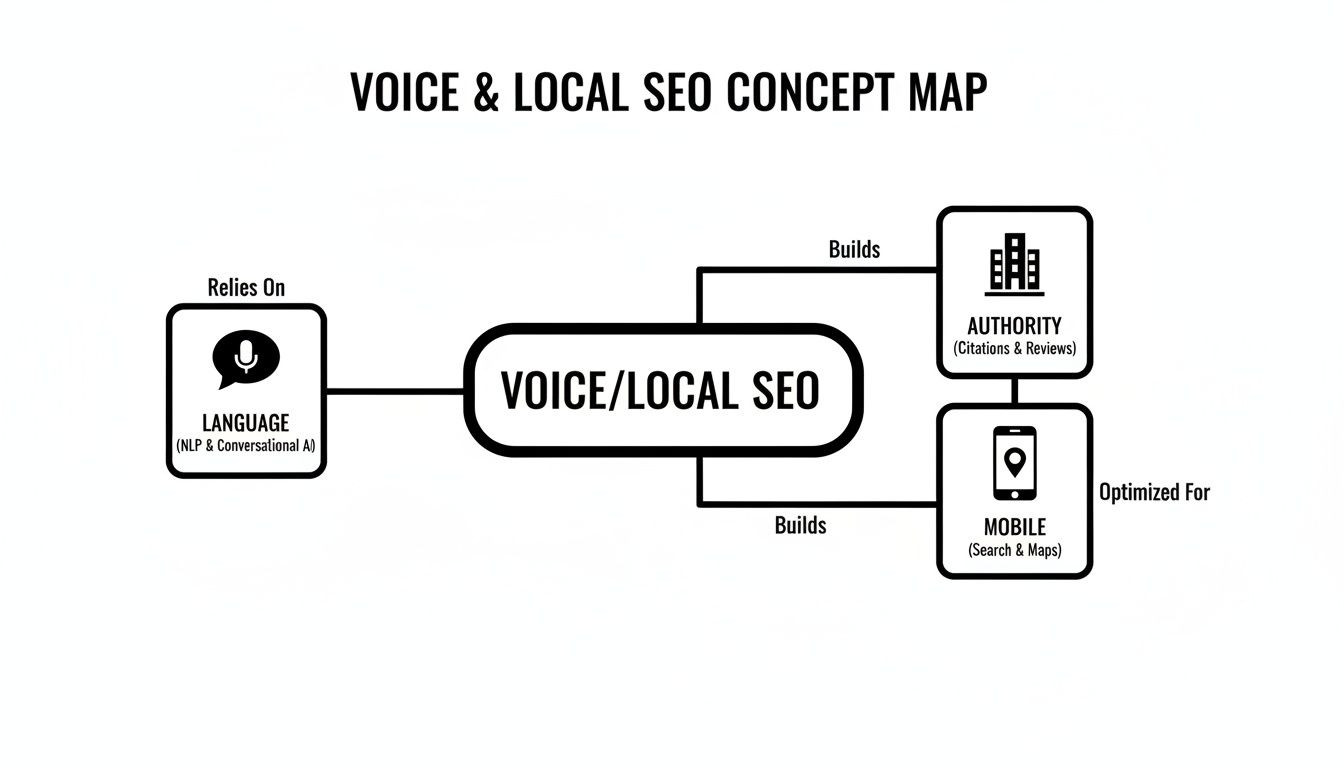
It shows how focusing on natural language, establishing local authority, and being mobile-ready all work together to capture those high-intent searchers.
Understanding the Real-World Impact
The numbers don't lie. Voice search is exploding, with forecasts showing over 1 billion monthly queries worldwide by 2026. What’s really important for local businesses is that 46% of people use it every day to find local information.
And where are these searches happening? On their phones. With mobile devices driving 58% of these queries, a mobile-first website isn't just a good idea—it's a requirement. Businesses that get this right see conversion rates that are 1.7x higher than from old-school text searches.
To give you a snapshot of what matters most, here’s a quick breakdown of the core pillars we’ll be covering.
| Core Pillars of Voice and 'Near Me' Optimization |
| :— | :— | :— |
| Optimization Pillar | Primary Goal | Key Tactic |
| Conversational Language | To match the natural way people speak when they search. | Creating FAQ-style content and using long-tail keywords. |
| Local Authority | To prove to Google that you are a trusted local expert. | Optimizing Google Business Profile and building local citations. |
| Mobile-First Experience | To provide a fast, seamless experience on smartphones. | Ensuring fast page speed and simple, touch-friendly navigation. |
These pillars aren’t just separate tasks; they’re interconnected parts of a strategy that makes you the best answer for local customers.
The goal is simple: be the most helpful and direct answer to a customer's spoken question. Search engines are built to reward businesses that provide instant value, and voice assistants take that a step further by reading that single best answer aloud.
This user behavior lines up perfectly with how newer search technologies like Google's AI models process information. You can learn more about this in our guide on how Google Gemini is shaping the future of search.
Seizing the Local Opportunity
For a local business, this is a golden ticket. You can connect with customers at the precise moment they need you most.
Someone asking, "Where's the best coffee shop near me that's open now?" is a customer ready to walk through the door. If your coffee shop is the one Google Assistant recommends, you've built instant trust and are far more likely to get their business.
To really dive into structuring your content for these new search habits, this comprehensive guide on how to optimize for voice search is an invaluable resource. When you master this, you're not just ranking on a results page—you're becoming the definitive local answer.
Optimizing Your Google Business Profile for Local Dominance
When it comes to winning "near me" searches, your Google Business Profile (GBP) is the undisputed champion. Think of it as your digital storefront—it’s the first thing people see and the main source of information Google Assistant or Siri pulls from when someone asks, "find a top-rated HVAC repair near me." A perfectly tuned GBP isn't just a listing; it's the engine that feeds voice search direct, confident answers about your business.
For any business asking how are you optimizing for 'voice' and 'near me' queries?, the answer starts right here. Just filling out the basic fields is table stakes. The real magic happens when you actively manage your profile, turning it into a dynamic, customer-generating machine that screams local relevance to Google.

This is what a customer sees—a blend of crucial information and engaging visuals that builds immediate trust, often before they even think about clicking through to your website. It’s this powerful mix of hard data and a great user experience that wins the local search game.
Beyond the Basics: Active GBP Management
A complete profile is just the starting line. To truly own your local search results, you have to treat your GBP as a living, breathing marketing channel. This means consistently using its features to show Google—and your potential customers—that you're active, engaged, and a trusted part of the local community.
A few practical moves here make a world of difference:
- Use Google Posts: Are you running a special? Hosting an event? Share it directly on your profile with a Google Post. These updates have an expiration date, which creates a natural sense of urgency and proves your business is current.
- Own the Q&A Feature: Don't wait for customers to ask questions. Proactively load your profile with common questions and provide clear, concise answers. This is a goldmine for voice search, as you're literally providing the exact answers people are speaking into their phones.
- Upload Geotagged Photos Regularly: Keep a fresh stream of high-quality, geotagged photos flowing. Show off your storefront, your team in action, and your finished work. This doesn't just make your profile look good; it sends powerful geographic signals to Google.
A static Google Business Profile is a wasted asset. An active, constantly updated profile becomes a primary source for Google's answer engine, letting you directly respond to high-intent "near me" and voice queries.
Building Trust Through Social Proof
Reviews are the currency of local SEO. A consistent stream of recent, positive reviews is one of the most powerful signals you can send for "near me" searches. Google sees this as undeniable proof that you're a popular, trustworthy local business.
But just getting reviews isn't enough. You need to respond to every single one, good or bad. This shows that you’re listening and that you value customer feedback. That kind of engagement builds a rock-solid reputation that both customers and search algorithms love to reward.
For a deeper dive into making your profile work for you, check out our guide on why Your Google Business Profile is a local SEO powerhouse. It's a critical piece of the puzzle for turning casual searchers into paying customers.
Rethinking Your Keyword Strategy for How People Actually Talk
The old days of obsessing over short, robotic keywords are over. Long gone. To have any real shot at winning in voice and "near me" searches, you have to get in tune with how your customers actually speak.
This means shifting your focus from traditional, clunky keyword research to uncovering the long-tail, conversational questions people are asking their devices every single day.
Let’s be real: nobody picks up their phone and barks, "Baltimore bakery." Instead, they ask, "where can I find the best gluten-free cupcakes near me?" Capturing that kind of search requires a much more nuanced approach—one that prioritizes natural language and genuine user intent.

This isn't just about driving more traffic. It’s about building trust by providing direct, helpful answers right when people need them most. When you do that, you position your business as the go-to local expert.
Uncovering Conversational Queries
So, where do you find these golden nuggets of conversational search? The good news is, the clues are often hiding in plain sight. You just need to know where to look.
Here are a few practical ways to get inside your customers' heads:
- Google's 'People Also Ask' (PAA): This section is a goldmine, plain and simple. Type in a core service you offer and just look at the related questions Google serves up. Those are real queries from real users.
- AnswerThePublic: This tool is fantastic for brainstorming. It visualizes all the who, what, where, when, why, and how questions people are asking around your main keywords.
- Your Own Customer Service Data: Listen to your team. What questions are they answering on the phone or via email all day long? Those are your starting points for creating powerful FAQ-style content.
The key is to stop thinking like a marketer and start thinking like a customer. Your keyword list should look less like a spreadsheet of terms and more like a list of real-world problems you can solve.
The Power of Long-Tail Keywords
Adopting this mindset is crucial because voice searches are fundamentally different. They are longer and more specific. In fact, voice search users can average a staggering 29 words per query—a world away from the two or three words we type.
This shift is vital, especially when you consider that 30% of all web browsing sessions are now screenless.
When you focus on these longer, more specific phrases, you attract an audience with much higher intent. Someone searching for "restaurants" is just browsing. But someone asking, "where can I find a dog-friendly Italian restaurant with outdoor seating near me?" is ready to make a reservation.
That's the customer you want.
For a deeper dive, check out our guide on how to do keyword research that aligns with modern search behavior.
Using Structured Data to Speak Google's Language
What if you could hand Google a cheat sheet for your business? That's precisely what structured data, or Schema markup, does. It translates your website's key information into a language search engines can instantly understand, removing all the guesswork about what you do, where you are, and when you're open.
This isn't about getting tangled in complex code; it's about giving search engines absolute clarity.
For voice and "near me" searches, that clarity is a complete game-changer. When someone asks their smart speaker a question, the device needs a fast, definitive answer. Structured data provides that confidence by explicitly defining your business details, making you the perfect candidate for a spoken result.
Think of it as setting up a direct line of communication with Google. You're not just hoping they figure out your business hours or services—you're telling them directly. This massively improves your odds of being the chosen answer.
Key Schema Types for Local and Voice Search
While there are hundreds of different schema types, a handful are absolutely critical for any local business that wants to win at voice search. Implementing just these few can give you a serious leg up on the competition.
Here are the heavy hitters:
- LocalBusiness: This one is non-negotiable. It’s where you mark up your business name, address, phone number (NAP), hours of operation, and even granular details like which payment types you accept.
- FAQPage: Perfect for those conversational, question-based keywords we talked about earlier. This schema signals to Google that a section of your page is dedicated to questions and answers, making it prime real estate for voice search answers and rich snippets.
- HowTo: If you offer any kind of step-by-step guides or instructions, this schema is gold. It breaks down the process in a machine-readable format, making it incredibly easy for a voice assistant to read the steps aloud to a user.
Structured data isn't just a technical SEO task—it's a strategic move to spoon-feed search engines the exact information they need to feature your business in voice search, local packs, and other prominent results.
A Practical Example in Action
Let’s picture a local law firm in Baltimore. Without structured data, Google has to crawl their website and try to piece together the important details. With structured data, the firm can spell everything out, leaving nothing to chance.
Using the LocalBusiness schema, they can explicitly define:
- Their precise service areas (e.g., Baltimore City, Anne Arundel County).
- Their specific legal specialties, like "Personal Injury" or "Family Law."
- Their office hours, including any upcoming holiday closures.
This simple act of labeling information makes it incredibly easy for a voice assistant to respond to a query like, "find a personal injury lawyer near me that's open now." The search engine doesn’t have to guess; the schema provides a clear, confident answer.
This simple technical step removes all ambiguity and immediately positions the law firm as a more reliable source of information than a competitor who hasn’t bothered with it. For a deeper look into the fundamentals, you can learn more about what structured data is in SEO in our detailed guide. It's a small effort with a massive strategic payoff.
Creating Authoritative Content with an FAQ-First Approach
If you want to truly master voice search, you need to adopt a simple yet incredibly powerful mindset: answer your customers' questions better than anyone else.
This means shifting your content strategy to what we call an FAQ-first approach. Instead of just talking at your audience, you directly address the problems and inquiries that sent them searching in the first place. This is the heart of optimizing for 'voice' and 'near me' queries—becoming the most helpful, authoritative source of information they can find.
The idea is to build dedicated pages or content sections that tackle these common questions head-on. By creating a central hub of reliable answers, you build massive topical authority and signal to search engines that you are the expert in your field.
This approach isn’t just great for users; it aligns perfectly with how voice assistants find and deliver information.
Crafting Voice-Ready Answers
The magic of an FAQ-first strategy is all in how you write the answers. For voice search, brevity and clarity are everything. Smart speakers and digital assistants don't read long, rambling paragraphs; they pull out concise, direct snippets.
Your target? Aim to answer each question in under 30 words.
This isn't just an arbitrary number. It forces you to be direct, cut the fluff, and get straight to the point, making your content perfect for being read aloud. A great pro-tip is to start the answer by restating the question, which gives the user immediate context and confirms the assistant understood them correctly.
For example, if the question is, "What are your business hours on weekends?" a perfect voice-ready answer would be:
"Our business hours on weekends are Saturday from 9 AM to 5 PM and Sunday from 10 AM to 4 PM."
It’s direct, clear, and instantly useful.
Answering questions concisely doesn't just optimize for voice search; it improves the user experience for everyone. People scanning your website on a mobile device appreciate quick, scannable information just as much as a smart speaker does.
The Power Duo: Content and Schema
This content strategy gets supercharged when you pair it with FAQPage schema. This piece of structured data is like a direct message to search engines, explicitly telling them, "Hey, this page has a list of questions and their corresponding answers."
This combination creates a one-two punch that can help you dominate the search results for question-based queries.
By marking up your content this way, you make it incredibly easy for Google to pull your answers for rich snippets and, more importantly, voice search results. It’s a technical step that validates your content's format, significantly boosting the odds that your business will be the chosen authority to answer a user’s spoken query.
At Raven SEO, we've seen this tactic consistently deliver incredible results for clients looking to capture high-intent customers at their exact moment of need.
Answering Your Top Questions About Voice and "Near Me" Search
As you start tweaking your strategy for how people actually talk and search, a few practical questions always pop up. Let's tackle the most common uncertainties businesses run into when they dive into the world of voice and "near me" SEO.
We'll give you direct, educational answers to help you focus on what really moves the needle.
How Long Does It Take to See Results from Voice Search SEO?
This is a common question, and the honest answer is: it depends. While some technical fixes, like adding schema markup, can get indexed and start showing an impact in a matter of weeks, ranking for competitive ‘near me’ queries is a marathon, not a sprint.
For most businesses starting out, you should expect to see meaningful, consistent results in about three to six months.
This timeline is heavily influenced by your starting point. Factors like the current health of your Google Business Profile, how fierce the local competition is, and the quality of your website content all play a huge role. At Raven SEO, we always build a solid foundation for long-term, sustainable growth rather than just chasing quick, temporary wins.
Do I Need a Mobile App to Rank in Voice Search?
No, you absolutely do not need a mobile app to succeed in voice search. This is a common misconception. The overwhelming majority of answers served up by voice assistants are pulled directly from mobile-friendly websites and well-maintained Google Business Profiles.
Your primary focus should be on creating a fast, responsive website that delivers a flawless user experience on a smartphone. For voice and local SEO, this is far more valuable and cost-effective than developing an app.
What Is the Most Important Factor for 'Near Me' Searches?
When it comes to "near me" searches, a fully optimized and consistently active Google Business Profile is king. It’s your digital storefront. While you can't magically move your business closer to every searcher, you have complete control over the quality and accuracy of your GBP listing.
A huge part of modern local SEO is mastering how to rank for 'near me' searches, because it’s all about meeting those immediate, on-the-go customer needs.
If you want to dominate local results, these are the non-negotiables:
- Accurate Business Information: Your name, address, and phone number (NAP) need to be perfectly consistent everywhere your business is mentioned online. No exceptions.
- A Steady Stream of Reviews: Consistently generating new, positive reviews—and responding to all of them—is a massive trust signal for both Google and potential customers.
- Active Feature Use: Regularly using features like Google Posts and the Q&A section shows Google you’re an active, engaged local business that’s worth recommending.
Can I Track Voice Search Traffic in Google Analytics?
This is a tricky one. You can't directly track voice search as a separate channel in Google Analytics—there's no "Voice Search" report, unfortunately.
However, you can absolutely connect the dots and find strong evidence that your efforts are working by looking for specific clues across your analytics tools. Our guide on how to optimize for voice search dives a bit deeper into what's possible here.
Look for a rise in long-tail, conversational queries in Google Search Console. In Google Analytics, keep an eye on spikes in organic mobile traffic and goal completions coming from mobile users. An increase in "click-to-call" actions or driving direction requests from your GBP insights are also powerful signs that your voice SEO strategy is paying off.
Ready to turn conversational searches into paying customers? The team at Raven SEO specializes in creating practical roadmaps to increase your visibility, traffic, and conversions. Get in touch for a no-obligation consultation to see how we can help your business stand out. Learn more at raven-seo.com.